Top Face Recognition Time Clock Systems for Businesses
A Face Recognition Time Clock can turn a crowded shift change into a quick glance at a wall-mounted terminal. But speed is only part of the story. Businesses also need dependable matching, clear attendance records, and a practical way to handle missed scans. The market is growing: Grand View Research estimated the global facial recognition market at USD 5.15 billion in 2022, with continued growth projected through 2030. That figure covers more than time clocks, so it signals wider adoption—not proof that every workplace needs facial recognition.
Independent testing offers a useful reality check. NIST’s Face Recognition Vendor Test research has examined how image quality and demographic factors can affect matching accuracy. Results vary by algorithm and conditions. A bright lobby may work well; a dim loading area may not. Biometrics researcher Anil K. Jain has stated, “Biometrics is not a secret.” That reminder matters: a face is not a replaceable password, and a time clock should not be judged by speed alone.
This guide compares leading systems for businesses, including enrollment workflows, integrations, reporting tools, and support. It also considers what happens when a camera struggles, an employee wears protective equipment, or a device loses network access. Small details count. No system is flawless, and vendor claims deserve testing against real shift conditions. The best choice is the one employees can use consistently and managers can verify without guesswork.
How Face-Recognition Time Clocks Work: 1:1 Verification vs. 1:N Search
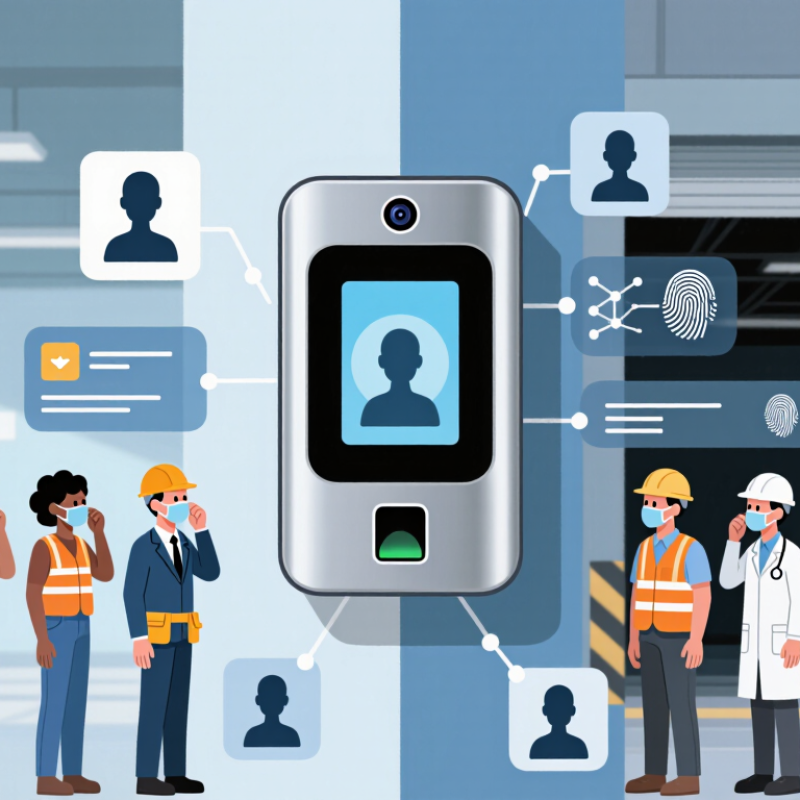
A face-recognition time clock can verify a worker in two main ways. In 1:1 verification, the employee first presents an identity, such as a badge or staff number. The clock compares the live image with that person’s stored face template. This focused check is usually simpler to audit and can reduce mistaken identity when several employees arrive together.
The routine is straightforward. Tap a badge, look at the camera, and wait for confirmation. Lighting, camera height, and a changed appearance can still affect results, so a clear retry process matters. Small details count.
With 1:N search, the clock captures a face and searches its enrolled templates to find a match, without asking the worker to identify themselves first. That can speed up a busy entrance, but the system must compare against many records. Match thresholds and enrollment quality therefore deserve careful testing; a fast result is not automatically a reliable one.
For either approach, businesses should review how templates are stored, who can access records, and what happens when a match fails. A staffed fallback protects payroll accuracy and keeps a missed scan from becoming a dispute. Pilot the clock during real shift changes, not just in a quiet office. I would not assume one mode fits every workplace.
Top Face Recognition Time Clock Systems for Businesses
How Face-Recognition Time Clocks Work: 1:1 Verification vs. 1:N Search
| Comparison dimension | 1:1 verification | 1:N search |
|---|---|---|
| How identification works | The employee first presents an identifier, such as a badge, PIN, or employee ID. The clock compares the face presented with that employee’s enrolled facial template. | The clock compares the presented face against a gallery of enrolled templates to determine which employee, if any, is a match. |
| Typical clock-in flow | Present badge or enter PIN, then complete the facial check. Some systems can perform the steps in a different order. | Look at the device; the system searches its enrolled gallery without requiring a separate employee identifier. |
| Search scope | One claimed identity is checked at a time. | One face is searched across multiple enrolled identities. Search workload generally grows with gallery size, though actual performance depends on the system. |
| Match decision | Accepts or rejects whether the face corresponds to the claimed employee, based on the system’s configured matching threshold. | Returns a likely identity when a candidate meets the configured threshold; otherwise, it can reject the match or request another method. |
| Operational considerations | Requires employees to have and use an identifier. This can help narrow the comparison to a single enrolled template. | Can reduce the need to touch a badge reader or enter a PIN, but depends on reliable identification from the enrolled gallery. |
| Accuracy factors | Results can vary with camera quality, lighting, pose, enrollment quality, threshold settings, and changes in appearance. | Results are affected by the same factors; the number and quality of gallery templates and the search threshold also matter. |
| Privacy and security | Both approaches process sensitive biometric data. Businesses should review applicable laws, provide required notices, limit access, and set retention and deletion rules. | As with 1:1, protect biometric templates and related records. A broader search capability makes clear access controls and defined use policies especially important. |
| Common fit | Workplaces that want face matching while employees continue to identify themselves with a badge, PIN, or other credential. | Workplaces that prefer employees to clock in by presenting their face without first entering a separate identifier. |
| Practical safeguards | Offer a non-biometric clock-in option, provide a way to correct missed or rejected punches, and review access and payroll records. | Use a non-biometric alternative, review potential false matches, and provide a clear process for correcting time records. |
Note: 1:1 and 1:N describe the matching process, not a guarantee of speed or accuracy. Actual results depend on the device, configuration, enrollment process, environment, and workforce procedures.
Related Posts
-
2026 Best Biometric Devices for Enhanced Security and Convenience?
-
How to Choose the Best Biometric Attendance Machine?
-

10 Reasons Why Biometric Attendance Machines Stand Out as the Best Choice for Modern Offices
-

Top 7 Essential Tips to Optimize Your Face Recognition Time Clock for Success
-

Exploring Fingerprint Time Clock Alternatives for Enhanced Workforce Management
-
2026 Best Fingerprint Attendance System for Global Buyers?